This article applies to:
Question:
What is Google Safe Search Enforcement in the filter
Reply
Google.com
When I make the selection as indicated in Fig.1 below does it enforce the “Strict Filtering” or “Moderate Filtering” under the google safe search?
The filter enforces the “Strict Filtering” option that these search engines deem as explicit text or inappropriate images.The filter just locks down the ability to change the filter options.
With the Google/Bing/Yahoo!/Youtube/Ask/AOL SafeSearch Enforcement option enabled, Google, Bing.com,Yahoo!, YouTube, Ask.com, and AOL’s “strict” SafeSearch Filtering option will be used whenever end users perform a Google, Bing.com, Yahoo!, YouTube, Ask.com, or AOL Web search or Image search.
WARNINGS: This feature is not compatible with the proxy environment as it will cause overblocking.
An inappropriate image will only be blocked if that image is included in Trustwave’s library or is blocked by Google, Bing.com, Yahoo!, YouTube, Ask.com, or AOL.
If this option is used in conjunction with the X Strikes Blocking feature and a user is performing an inappropriate Google, Bing.com, Yahoo!, YouTube, Ask.com, or AOL Image search, the number of strikes that user will receive is based upon the amount of time it will take for unacceptable Google, Bing.com, Yahoo!, YouTube, Ask.com, or AOL images returned by the query to load on the page. The user receives only one strike if all inappropriate
images load within the tolerance time range of a given strike.
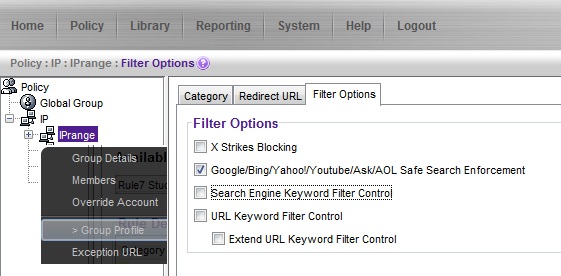
Fig.1
WARNING: If this option is used in conjunction with the X Strikes Blocking feature and a user is performing an inappropriate Google, Bing.com, Yahoo!, YouTube, Ask.com, or AOL Image search, the number of strikes that user will receive is based upon the amount of time it will take for unacceptable Google, Bing.com,
Yahoo!, YouTube, Ask.com, or AOL images returned by the query to load on the page. The user will receive only one strike if all inappropriate images load within the tolerance time range of a given strike.
- This article was previously published as:
- 8e6 KB 297461
