This article applies to:
Question:
How do I prevent Firewall Suite from sending report e-mail attachments as a zip file?
Procedure:
By default, Firewall Suite compresses reports prior to sending them via e-mail.
To configure e-mail options so that report files are not compressed before being e-mailed, please follow these steps.
- Click the Options link from the Main Console.
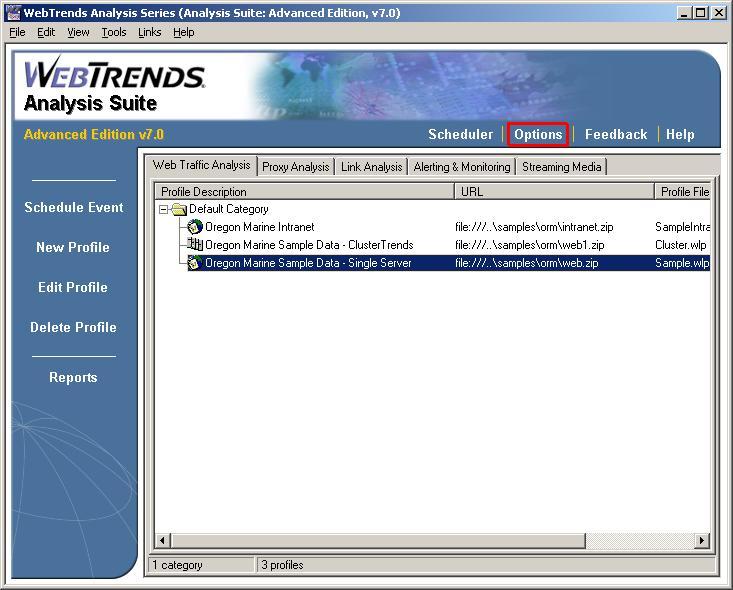
- Once the Options dialog window populates, click the Main option located in the top, left corner menu, and then select e-Mail.
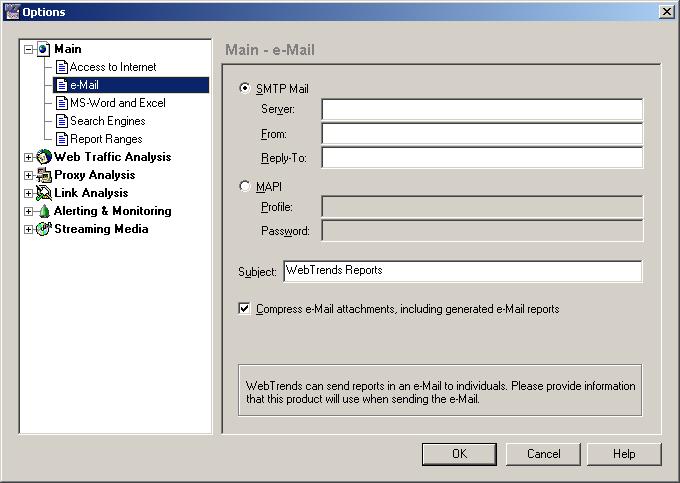
- Uncheck the box for Compress e-Mail Attachments, including generated e-mail reports, and click OK.
Firewall Suite will no longer compress the report files prior to attaching them in an e-mail.
Notes:
For assistance in configuring Firewall Suite to send e-mail, please see the following knowledge base article.
Q10303: How do I configure WebTrends to use SMTP or MAPI to e-mail reports?
- This article was previously published as:
- NETIQKB5559
