
LevelBlue Named Official Cybersecurity Advisor of the PGA of America. Learn more

LevelBlue Named Official Cybersecurity Advisor of the PGA of America. Learn more

Services
Cyber Advisory
Managed Cloud Security
Data Security
Managed Detection & Response
Email Security
Managed Network Infrastructure Security
Exposure Management
Security Operations Platforms
Incident Readiness & Response
SpiderLabs Threat Intelligence
Solutions
BY TOPIC
Offensive Security
Solutions to maximize your security ROI
Operational Technology
End-to-end OT security
Microsoft
Unlock the full power of Microsoft Security
Securing the IoT Landscape
Test, monitor and secure network objects
Why LevelBlue
About Us
Awards and Accolades
LevelBlue SpiderLabs
PGA of America Partnership
Secure What's Next
LevelBlue Security Operations Platforms
Security Colony
Partners
Microsoft
Unlock the full power of Microsoft Security
Technology Alliance Partners
Key alliances who align and support our ecosystem of security offerings
Loading...
Loading...

INFO: Why does an error result when trying to analyze regular and accounting Check Point LEA log files?

Expand / Collapse


This article applies to:

  • Firewall Suite 4.X

Question:

Why does an error result when trying to analyze regular and accounting Check Point LEA log files?

Causes:

The error message is caused by trying to analyze both Check Point LEA log file types, regular and accounting. If you check the following directory you should see both logs:

    [WebTrends_Installation_Directory]\LEACache

An example of a regular log:

    2002_01_15.log

An example of an accounting log:

    2002_01_15_a.log


Information:

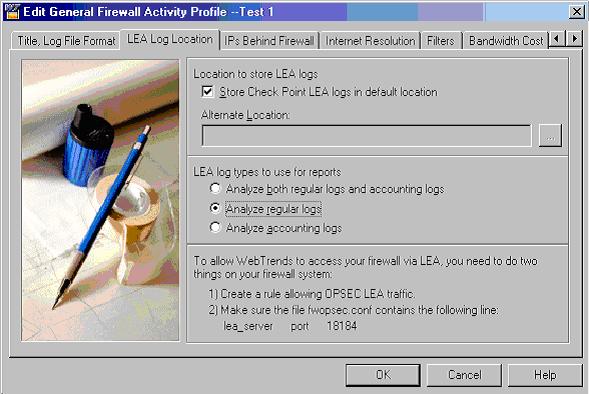
If you do not have both types of log files, edit your profile, and under the LEA log location, change the option for LEA log types to use for reports to the option that corresponds to the type of log file you wish to analyze.

See screen shot below for details.


This article was previously published as:
NETIQKB565

To contact LevelBlue about this article or to request support:


Rate this Article:
     
Tags:

Add Your Comments


Comment submission is disabled for anonymous users.
Please send feedback to Trustwave Technical Support or the Webmaster
.