This article applies to:
Question:
Creating two override account with minimum/no restriction
Reply
I have two over ride IPGroup accounts but needed one to have a complete unfiltered profile including bypass/over ride the minimum filtering level, and the other over ride account should not over ride/by-pass the minimum filtering level. How do I accomplish this?
Step 1:
Set up your minimum filtering level and remember to block or pass categories as you desire, and then click apply. (NB: You don’t have to leave it in the form below as in Fig. 1)
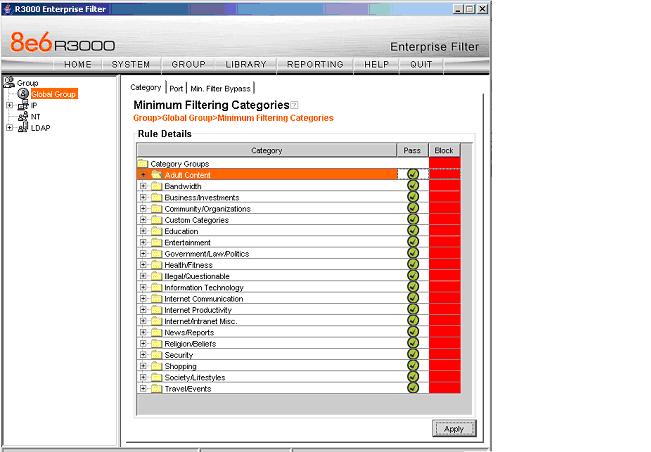
Fig. 1
Step 2.
Set the minimum filtering bypass option by checking the box as indicated below. With the check box both over ride accounts will bypass the minimum filtering level but will then depend on the individual policy/profile been applied to the accounts.
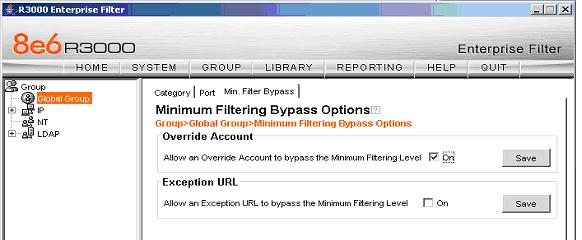
Fig. 2
Step 3.
For unfiltered over ride account:
Setup your IPGroup over ride account or if you have it existing then click the ‘view/modify’ using fig. 3 and 4 below:
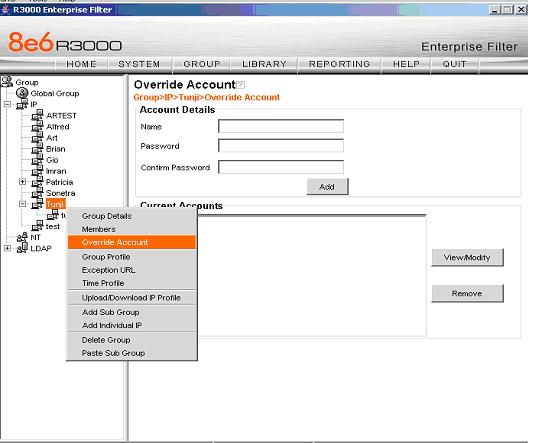
Fig. 3
You can leave everything set to pass as in Fig. 4 below and since its not going to be filtered.
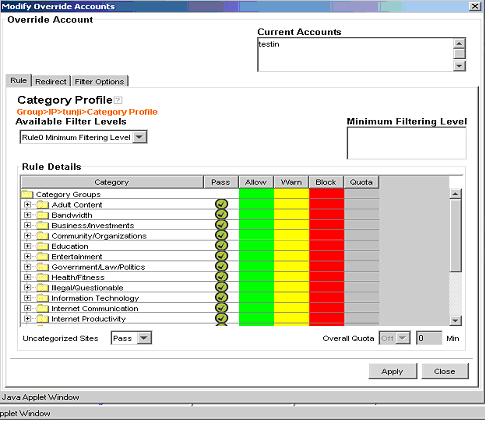
Fig. 4
Step 4.
For filtered over ride account.
For this option you can modify/change the profile in Fig. 4 so that it blocks those category/categories that matches the minimum filtering level. For example if you block Child pornography, and Pornography/Adult in the adult content category in Fig. 1 above then you need to do same thing and even more in Fig. 4. With this setup and despite they have over ride account these categories will still be blocked.
Also remember to click ‘Apply’ each time you make the changes/modification in the profile.
