This article applies to:
- SWG 7000
- AMM (Advanced Management Module)
Question:
- How can I reset the settings of an AMM?
Procedure:
The management module reset button is shown in the following figure.
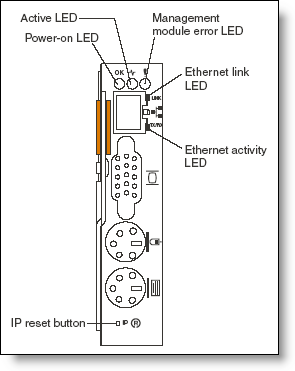
Use a straightened paper clip or similar item to access it. The reset button has two uses:
- Reset the network configuration: Press and hold the reset button for 3 seconds or less.
- Reset the entire management module (including user IDs and passwords) to the factory defaults. This requires a sequence of presses and releases:
- Press and hold the reset button for 5 seconds.
- Release the button and wait 5 seconds.
- Press and hold the button for another 10 seconds.
- Note that this sequence should be as precise as possible to ensure success: 5 in, 5 out, 10 in. After you do a full factory defaults reset in this way, the default user ID and password will be in effect: USERID (all caps) and PASSW0RD (a zero, not the letter O).
After the network configuration has been reset, you can access the Web interface to reconfigure it. To do this, you will need to know the management module's IP address. This can be done as follows:
- The management module defaults to using DHCP. The host name will be MMxxxxxxx, where xxxxxxx is the MAC address of the management module. This number is printed below the reset button.
- If no DHCP server is found, the management module uses a default IP address of 192.168.70.125 with subnet mask 255.255.255.0. The host name will be MMxxxxxxx.
Notes:
Because it is possible to reset the passwords using the reset button, you should ensure that your BladeCenter chassis is physically secure so that only authorized personnel can physically access the reset button.
Source: IBM @ http://www.redbooks.ibm.com/abstracts/tips0519.html
