This article applies to:
Question:
- Malware Entrapment Profile level is set to Strict, however, transaction shows Basic, Medium and Strict levels. Why?
- Malware Entrapment Profile is blocking too much/little content. Can I adjust it?
Information:
As of SWG 10.1, the User Interface allows adjustment of Malware Entrapment Profile (MEP) security level. To do this, highlight the Malware Entrapment Profile condition in the "Block Malicious Content (Malware Entrapment Engine)" Rule and set its level as desired in the right pane, as shown below:
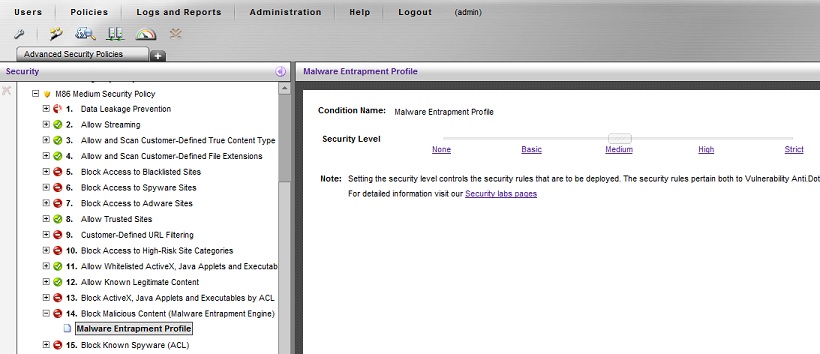
Web content will be blocked by MEP up to and including the specified threshold, e.g. if set to Medium, content is blocked if it breaks Basic or Medium. The transaction log will show what MEP level was reached, so if MEP is set to Strict the transaction logs will show Basic, Medium and Strict entries.
Note that if the Logging Policy is set to log more than Blocked/Corrective actions (e.g. "Log everything except images"), then the logs will show MEP levels for traffic that was not blocked, indicating that the Entrapper engine was called but allowed the traffic, as shown in green below:
Notes:
None.
