This article applies to:
- SWG 10.x
- SWG 11.x
- Users running Microsoft Windows Vista or Microsoft Windows 7
Symptoms:
Symptoms may vary depending on SWG identification implementation.
In some cases, when the user first boots into the Windows OS they get a message from Microsoft Networking with a yellow exclamation icon in the system tray.
The error message that opens is "No Internet Access".
The yellow exclamation icon goes away as soon as the user opens Internet Explorer.
Another variation is that the users are identified as Unknown Users, and as a result the incorrect security policy is enforced for such users.
This can be verified in the Web Logs view showing Authenticated User Names containing '$' signs:
Causes:
This behavior is unique to Window Vista and Windows 7 OS versions after the Network Connectivity Status Indicator (NCSI) feature was introduced in Windows Vista.
NCSI is designed to be responsive to network conditions, so it examines the connectivity of a network in a variety of ways. Once a test fails, NCSI may report an error, even if the network can actually be fully accessed.
For example, NCSI tests connectivity by trying to connect to http://www.msftncsi.com, a simple website that exists only to support the functionality of NCSI.
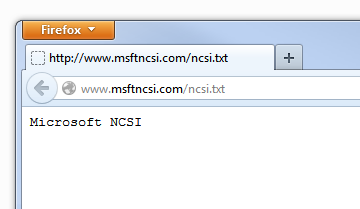
Try to manually visit the website http://www.msftncsi.com/ncsi.txt. You should see “Microsoft NCSI”:
A proxy server requiring user authentication won't allow it to access the Internet.
Resolution:
There are two ways to resolve this issue:
1. By bypassing *.msftncsi.com/* for Authentication purposes.
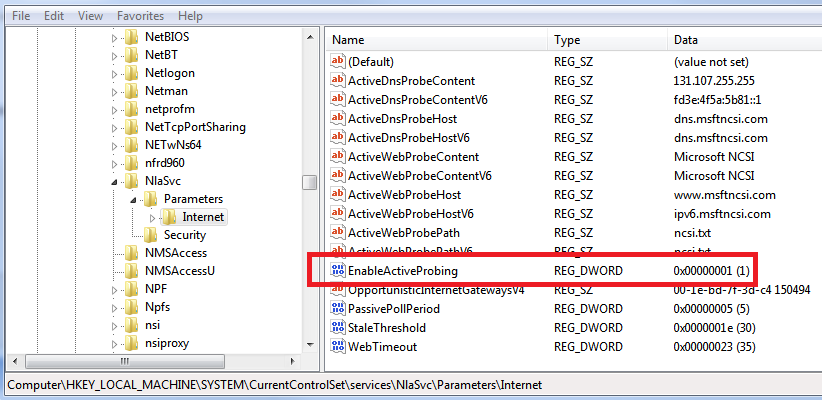
2. By modifying registry settings to disable the NCSI functionality:
- Run regedit (administrative permission is required)
- Navigate to the following key:
HKEY_LOCAL_MACHINE\SYSTEM\CurrentControlSet\services\NlaSvc\Parameters\Internet\
- Locate EnableActiveProbing parameter
- Allowed values: 1 - Enable NCSI, 0 - Disable NCSI
These registry settings can be distributed globally as part of the Group Policy push from the Domain Controller.
