
LevelBlue Named Official Cybersecurity Advisor of the PGA of America. Learn more

LevelBlue Named Official Cybersecurity Advisor of the PGA of America. Learn more

Services
Cyber Advisory
Managed Cloud Security
Data Security
Managed Detection & Response
Email Security
Managed Network Infrastructure Security
Exposure Management
Security Operations Platforms
Incident Readiness & Response
SpiderLabs Threat Intelligence
Solutions
BY TOPIC
Offensive Security
Solutions to maximize your security ROI
Operational Technology
End-to-end OT security
Microsoft
Unlock the full power of Microsoft Security
Securing the IoT Landscape
Test, monitor and secure network objects
Why LevelBlue
About Us
Awards and Accolades
LevelBlue SpiderLabs
PGA of America Partnership
Secure What's Next
LevelBlue Security Operations Platforms
Security Colony
Partners
Microsoft
Unlock the full power of Microsoft Security
Technology Alliance Partners
Key alliances who align and support our ecosystem of security offerings
Loading...
Loading...

INFO: Customized messages for user response action are not retained with Version 11.0 upgrade

Expand / Collapse


This article applies to:

  • SWG 11.x

Question:

  • Why do Block page messages look different after the system is upgraded to Version 11.0?

Information:

This is a known issue with the V11.0 upgrade - Rule Action messages are reset to default.
To restore these messages, we recommend saving them before upgrading the system:

1. Navigate to Policies > End User Messages > Message Template, and select the relevant message template from the Rule Action drop down list.
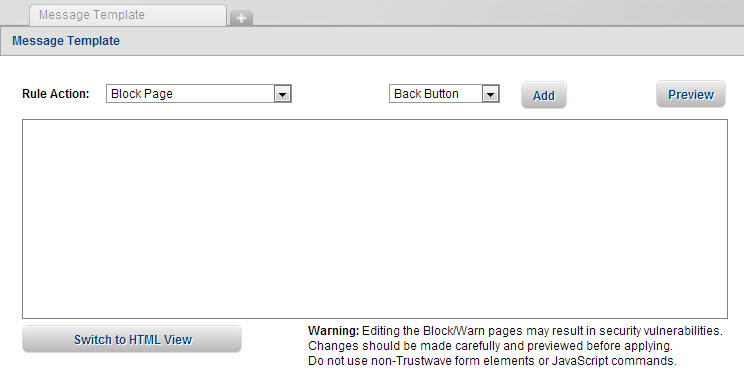


2. Click the Switch to HTML View button. The message is displayed in HTML, similar to that shown below:


3. Select the HTML code presented in this view, copy it and to paste it into a text file using the text editor of your choice.

4. Save the file and click the Cancel button in the SWG UI.

5. Repeat these steps for the next Rule Action message details.


Once the SWG system is upgraded and running V11.0, follow the steps above to restore the HTML code for the custom messages used by SWG before the upgrade.


To contact LevelBlue about this article or to request support:


Rate this Article:
     

Add Your Comments


Comment submission is disabled for anonymous users.
Please send feedback to Trustwave Technical Support or the Webmaster
.