This article applies to:
Question:
- How do I upgrade my SWG from 10.2 to 11.0?
Procedure:
A new system has been introduced into SWG 10.2 and 11.0 to enable the download and upgrade to a new version from the Policy Server Management GUI. Follow the steps below to complete the upgrade process:
1. Log into your SWG Policy Server.
2. Navigate to Administration > Updates > Update Management.
3. Click Install on the version 11 upgrade item. If this item is not present, click Retrieve Updates.
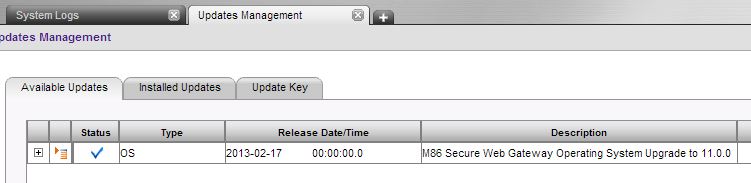
4. The rest of the install process is automatic.
To install the upgrade on scanners:
1. Go to Administration > System Settings > Trustwave Devices.
2. Right-click each relevant device and select Upgrade Scanners to PS Version.
Notes:
The install process can take as long as 1 hour or more. During the upgrade process, GUI access can be limited or inaccessible. Allow extra time after notification that the install process is finished - back-end and other processes not visible may still be coming online and upgrading.
Important: The Upgrade will stop production scanning.
